Batchify Pro — Photoshop Variable Data & CSV Automation
Effortlessly batch-generate e-commerce product catalogs, real estate listings, corporate ID cards, social media creatives, retail promos, and agency client work in Photoshop directly from CSV spreadsheets.
Free Tier ($0) includes full functionality capped at 5 rows per export run. Solo Pro — $29 lifetime unlocks unlimited rows, priority export processing, and lifetime updates.
Instant activation with seamless offline usage support. Already licensed? Manage License / Portal
See Batchify in Action
Real screenshots of the Batchify.jsxbin control panel running inside Adobe Photoshop CC — from CSV-to-layer binding and Pro license activation to live batch export progress.
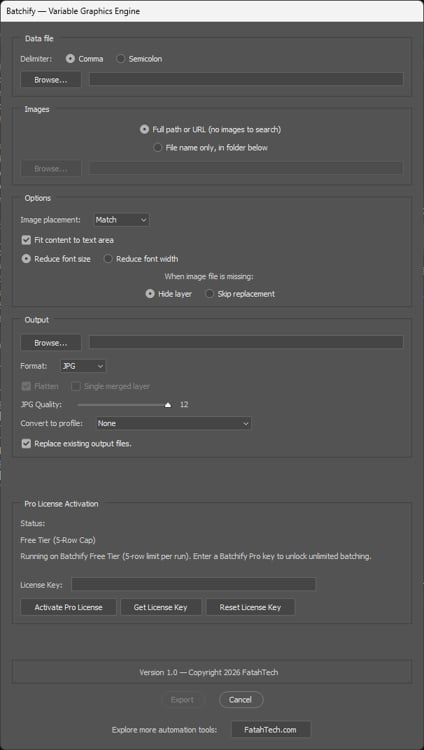
Batchify Control Panel
Screenshot 1 of 3 · use ← / → to browse
Built for Production-Scale Design Pipelines
Every feature in Batchify is engineered to eliminate repetitive manual work while protecting your template integrity — powering multi-industry design pipelines from e-commerce product catalogs and real estate listings to corporate ID cards, social media marketing automation, retail promos, and digital agency workflows.
Complete Variable Substitution
Automatically maps CSV column headers to Photoshop layer names for image replacements, text updates, hex color fills (#RRGGBB), and layer visibility toggles (yes/no).
Smart Object & Proportional Placement
Auto-converts target image layers to Smart Objects with layer style preservation. Supports 4 proportional scaling modes: Fill, Fit, Stretch, and Match.
Smart Text Fitting (Fit Content to Text Area)
Shrink-only font sizing algorithm that measures text bounds and steps down font sizes finely without ruining design typography or over-shrinking. Preserves exact template font size when text fits natively.
Multi-Format Export & Color Profiles
Export to PNG, JPG, PSD, TIF, and BMP formats with custom quality sliders and ICC color profile conversions for print-accurate output.
Offline Ready & Fast Setup
Runs directly inside Adobe Photoshop CC (2018+) on Windows & macOS via standard .jsxbin ExtendScript. Fully functional offline once activated — no installer or admin rights needed.
100% Local & Private
All batch processing and file exports run locally inside Photoshop on your computer. Your PSD assets and CSV data never touch external servers.
Free Tier vs. Solo Pro — $29 Lifetime
Start free — no credit card, no time limit. Full functionality capped at 5 rows per export run. Upgrade to Solo Pro for unlimited scale.
Full functionality capped at 5 rows per export run. Perfect for evaluation and small batches.
- 5 rows max per run
- All variable types (image / text / color / visibility)
- PNG / JPG / PSD / TIF / BMP export
- Photoshop CC 2018+ · Windows & macOS
Unlimited CSV rows, priority export processing, and lifetime updates. Instant activation with seamless offline usage support.
- Unlimited CSV rows — no per-run cap
- Priority export processing
- Lifetime updates included
- 2 Active Machine Activations included
- Full commercial rights
- Direct FatahTech support
Secure checkout via Polar. Manage License / Portal
| Feature | Free ($0) | Solo Pro ($29 Lifetime) |
|---|---|---|
| Price | $0 — Free forever | $29 USD — Lifetime License |
| Rows per export run | 5 rows max per run | Unlimited CSV rows |
| Core automation engine | Included | Included |
| Variable substitution (image / text / #RRGGBB / yes-no visibility) | Included | Included |
| Smart Object conversion + Fill / Fit / Stretch / Match | Included | Included |
| Smart Text Fitting (Fit Content to Text Area) | Included | Included |
| Export formats (PNG / JPG / PSD / TIF / BMP) + ICC profiles | Included | Included |
| Photoshop CC 2018+ on Windows & macOS (.jsxbin) | Included | Included |
| License activation | No key required | Instant activation with seamless offline usage support |
| Updates | Community | Lifetime updates included |
| Export processing | Standard | Priority export processing |
| Commercial use | Personal / Evaluation | Full commercial rights |
| Support | Community | Direct FatahTech support |
Three Steps to Bulk Export
Prepare Template & CSV
Design your PSD with named layers matching CSV headers. Use Image, Text, and Color layers — name them exactly as your spreadsheet columns. Add a 'file name' header column to customize output filenames per row. If omitted, Batchify automatically generates structured filenames formatted as TemplateName_Row001 to prevent naming collisions.
Run Batchify.jsxbin inside Adobe Photoshop
For a permanent install, copy Batchify.jsxbin into your Photoshop Presets\Scripts folder — Windows: C:\Program Files\Adobe\Adobe Photoshop [Version]\Presets\Scripts\, macOS: /Applications/Adobe Photoshop [Version]/Presets/Scripts/ — restart Photoshop, then run it via File > Scripts > Batchify. For one-time use, load it via File > Scripts > Browse instead. The dialog lets you pick your CSV, configure image placement (Fill / Fit / Stretch / Match), toggle Fit Content to Text Area, and choose output format (JPG, PNG, PSD, TIF, BMP).
Hit Export & Bulk Render
Select your CSV, configure output folder & format, and click Export. Batchify processes every row — updating images, text, colors, and visibility — then exports one file per row with real-time progress tracking. Free Tier processes up to 5 rows per run; Solo Pro is unlimited.
Technical Specs & Setup Guide
Layer Name Matching
CSV headers must exactly match PSD layer names (case-sensitive). Image columns replace pictures, text columns update copy, hex columns fill solid colors (#RRGGBB), and LayerName:visible columns toggle visibility with yes / no. Headers with no matching layer are safely skipped.
Delimiters & Encoding
Supported delimiters: Comma (,), Semicolon (;), Tab (\t / TSV), and Pipe (|). Save CSV files in UTF-8 or UTF-8 with BOM encoding to preserve international accents, non-English scripts, and special symbols on text layers.
Image Paths & Output Filenames
Full path mode — cell holds an absolute file path (e.g. C:\images\hero.jpg).
Filename mode — select an asset search folder in the dialog; cell contains just the filename.
Use a file name header column to customize output filenames per row (no extension needed). If omitted, Batchify auto-generates names to prevent collisions. All filenames are sanitized — invalid characters (/ \ : * ? " < > |) are stripped automatically.
file name,HeroImage,TitleText,BrandColor,HeroImage^fit^center,BadgeGroup:visible
banner_01,hero1.jpg,Summer Sale,#FF0000,,yes
banner_02,hero2.jpg,Winter Deals,#0000FF,,no