FatahTech Agency Suite — Complete Photoshop & Excel AI Automation Pipeline
Equip your agency or design team with multi-workbook Excel processing, AI copy synthesis, and automated Photoshop CSV/XLSX export pipelines.
One bundle, both Pro tools: Sheet Automator AI Pro + Batchify Pro with multi-seat team activation, commercial client rights, and a self-service license portal.
Instant activation with seamless offline usage support. Already licensed? Manage License / Portal · Skip to downloads ↓
Two Pro Tools. One Unified Pipeline.
Every Agency Suite seat unlocks both products below, engineered to work as a single Excel → AI → Photoshop automation chain.
Sheet Automator AI Pro
- Multi-workbook Excel ingestion (
brand_list.xlsx+product_list.xlsx) - Built-in AI copy synthesis (OpenAI, DeepSeek, local Ollama / OmniRoute)
- Production-ready UTF-8 BOM
today_promos.csv+ formattedrun_summary.xlsx
Batchify Pro
- Automated Photoshop variable data rendering via
Batchify.jsxbin - Unlimited batch exports with multi-format outputs (PNG / JPG / PSD / TIF / BMP)
- Smart layer binding — Smart Objects, text fitting, and visibility toggles
Both Pro Tools, One Pipeline
Switch between the two bundled applications to preview the real interfaces your Agency Suite seats unlock — from multi-workbook Excel ingestion to Photoshop variable data rendering.
Batchify Pro — the Photoshop variable data engine: CSV-driven image, text, hex color, and layer visibility automation with unlimited batch export.
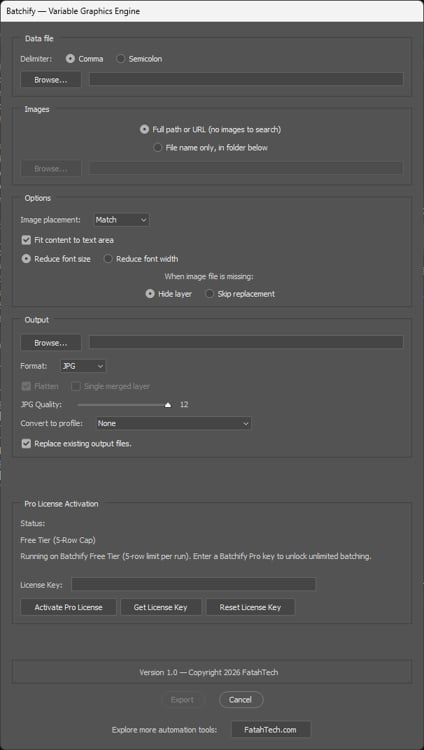
Batchify Control Panel
Screenshot 1 of 3 · use ← / → to browse
Simple Team Licensing
Every tier includes both Pro tools with commercial client rights and self-service seat management.
5 Active Machine Activations
- Includes Sheet Automator AI Pro + Batchify Pro
- 5 Machine Activations included
- Annual license updates & priority email support
- Commercial & agency client use allowed
- Self-service license management portal (seat transfer / revokes)
3 Active Machine Activations
- Includes Sheet Automator AI Pro + Batchify Pro
- 3 Machine Activations included (Pay once, keep forever)
- Lifetime access to software updates & patches
- Commercial & agency client use allowed
- Self-service license management portal (seat transfer / revokes)
The Unified 5-Step Pipeline
How Sheet Automator AI and Batchify Pro work together seamlessly
Raw Excel (.xlsx)
Ingest Brand & Product List
AI Synthesis
Generate Headlines & Hex Colors
CSV Export
Generate UTF-8 BOM today_promos.csv
Batchify.jsxbin
Execute Photoshop Smart Script
Finished Assets
High-Res PNG / JPG / PSD Output
Download Center
For existing license holders and evaluators — both tools pull straight from the latest release.
Desktop Engine — Sheet Automator AI
Native installer for your OS, always the latest release.
Photoshop Companion — Batchify Pro
Variable-data rendering script for Adobe Photoshop CC 2018+.
Permanent install (recommended): copy batchify.jsxbin into your Photoshop scripts folder and restart Photoshop to run it via File › Scripts › Batchify — Windows: C:\Program Files\Adobe\Adobe Photoshop [Version]\Presets\Scripts\, macOS: /Applications/Adobe Photoshop [Version]/Presets/Scripts/. One-time use: open Photoshop and go to File › Scripts › Browse... and select batchify.jsxbin.
Technical Specs & License Policy
Activation Management
Seats are tracked per license key — each active machine consumes one seat (Yearly: 5 seats · Lifetime: 3 seats · Enterprise: custom quantity). Retiring a workstation? Deactivate old machines anytime via the customer portal to free up seats. Seat transfers and revokes are fully self-service — no support ticket required.
System Requirements
Sheet Automator AI runs on Windows 10/11 (.msi) and Linux (.AppImage, .deb). Batchify.jsxbin runs inside Adobe Photoshop CC (2018+) on Windows & macOS. Both tools work fully offline once activated.
Commercial Terms
Full commercial rights for agency client deliverables — use both Pro tools across unlimited client projects, product catalogs, marketing campaigns, and reporting pipelines. Enterprise tiers add centralized billing and invoice payment options.
Installation Guide & Security Notice
Step-by-step instructions for setting up Sheet Automator AI on your operating system.
Unsigned Binary Notice
As an independent software studio, FatahTech distributes binaries directly to keep operations lean and software affordable. Windows SmartScreen and macOS Gatekeeper may display a standard prompt on initial launch because we do not currently license commercial vendor certificates. Our software is clean, privacy-focused, and free of background trackers. You can verify binary integrity using the SHA-256 hashes listed below.
Windows (.msi / .exe)
Grab the .msi installer (recommended) or the standard .exe setup from the download buttons above.
- 1Download your preferred installer format (
.msirecommended for standard installations). - 2If Windows SmartScreen pops up with "Windows protected your PC", click "More info" and then click "Run anyway".
- 3Follow the installation wizard prompts to complete the setup.